The TI format stores transient images in a binary file with .ti
extension. It is specifically tailored to the context of NLoS
reconstruction, as it contains not only the measured light but also
geometrical information about the scene that can be used during the
reconstruction.
Basics
Each file consists of four Blocks:
| Block name | Description |
|---|---|
| File header | File format version, information about following blocks |
| Pixel data | Linear raw array filled with transient histograms |
| Pixel interpretation | Geometric arrangement of transient histograms |
| Image properties | Flexible meta information as JSON encoded string |
The ti format is intended to be simple but versatile.
Actual image data is stored in raw arrays and can be read with a few
lines of code in most languages without the need of external libraries.
Additional features like compression that are found in other formats
such as HDF5 were not included on purpose to keep the format simple.
All transient histograms are unwarped, meaning that the time-of-flight of the first (light source to reflector) and forth (reflector to detector) path segment are already removed. In the image properties block additional information about the light source and detector position can be given, so that the full path length can be reconstructed if needed.
Furthermore, all data is stored in little-endian mode and no implicit padding bytes are used.
Bin mapping
The current file format version assumes equidistant sampling in the time domain but supports both regular and flexible sampling in the spatial domains (through the use of different pixel modes).
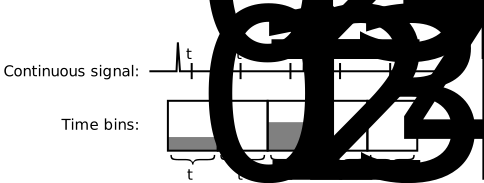
The continuous signal is discretized into time bins, where each bin is denoted by its center time:
File header
The header always has a constant size (28 bytes) and contains basic information about the image file.
| Size | Type | Name |
|---|---|---|
| 4 byte | signed int8[4] | magicNumber = 'TI04' = [84, 73, 48, 52] |
| 4 byte | unsigned int32 | pixelMode |
| 4 byte | unsigned int32 | numPixels |
| 4 byte | unsigned int32 | numBins |
| 4 byte | float32 | tMin |
| 4 byte | float32 | tDelta |
| 4 byte | unsigned int32 | pixelInterpretationBlockSize |
- magicNumber
Identifies this file as a transient images. Also contains the file format version (currently 04).
- pixelMode
Block type used to store pixel interpretations
- numPixels
Total number of pixels in the image
- numBins
Amount of float values that are stored for each pixel
- tMin
Path length corresponding to the zeroths bin
- tDelta
Thickness of each time bin in path length
- pixelInterpretationBlockSize
Size of the pixel interpretation block in bytes. In Mode 10 this value is 68.
magicNumber (first four bytes) to check file version, as the rest of the file header might change in future releases.The header helps to identify the format version and the size of the
following blocks. The transient data block size is not explicitly stored
as it can be computed easily as numPixelsnumBinssizeof(float32). The image properties block occupies the rest of the file.
In Figure 1, tMin corresponds to and tDelta to . The image does not contain any information about light arriving before tMin - tDelta/2.
Pixel data
Transient pixels (a histogram of the amount of light that the pixel received in each time bin) are stored as one big, linear float array:
| Size | Type | Name |
|---|---|---|
numPixels*numBins*4 byte | float32[numBins][numPixels] | pixelData |
The values are stored pixel-major and not bin-major. Thus, all bin
values for a single pixel are directly next to each other in memory. To
access the fifth temporal bin in the tenth pixel, the following C++-Code
should be used: pixelData[numBins*10 + 5].
Pixel interpretation
The pixel interpretation block contains information about the observed and illuminated point on the reflector for each pixel (i.e. transient histogram). In principle arbitrary combinations are possible, but most of the time only a single positions is illuminated (or observed), and a regular grid of positions is observed (or illuminated). In these cases, more efficient storage for the sample positions is possible, leading to the different pixel interpretation modes.
Mode 10.In the future, more modes might be added. However, it is not advantageous to have a dedicated mode for every special case, as this complicates the format, thus we try to keep the amount limited.
Mode 0
In this most general case, each pixel has a observation and illumination position associated.
| Size | Type | Name |
|---|---|---|
| 12 byte | float32[3] | laserOrigin |
| 12 byte | float32[3] | laserNormal |
| 12 byte | float32[3] | cameraOrigin |
| 12 byte | float32[3] | cameraNormal |
This block is repeated for each pixel. Thus, the total size is 48 byte * numPixels.
Mode 10
The scene is illuminated from a single point on the reflector (laserPosition)
and the reflector is observed in a rectilinear grid (i.e. tessellation
by non-congruent parallelograms). The grid is the result of a Cartesian
grid being projected onto the reflector via a homography. This
homography is defined by the coordinates of the four corner pixel on the
reflector (topLeft, topRight, bottomLeft, bottomRight). This mode is currently used in all benchmark scenes.
| Size | Type | Name |
|---|---|---|
| 4 byte | unsigned int32 | uResolution |
| 4 byte | unsigned int32 | vResolution |
| 12 byte | float32[3] | topLeft |
| 12 byte | float32[3] | topRight |
| 12 byte | float32[3] | bottomLeft |
| 12 byte | float32[3] | bottomRight |
| 12 byte | float32[3] | laserPosition |
It is assumed that the wall is planar (topLeft, topRight, bottomLeft, bottomRight and laserPosition
all lie in the same plane). Thus, the reflector normal is the same for
the illumination point and all observed positions and can be computed
from the given points on the plane.
The transient pixels are stored in a row major order. With as the dimension left-right and as the dimension top-bottom, a value is stored at data[(vuResolution+u)numBins+t]
bottomRight == topRight+bottomLeft-topLeft can be used to checked, whether a homography is actually needed.Mode 20
This mode is the reciprocal case of Mode 1, where the role of the camera
and laser are flipped: The wall is illuminated at multiple points while
only a single one is observed. Due to reciprocity of light transport,
this mode behaves exactly as Mode 10 and is only included for semantic
reasons. Only the laserPosition field should be interpreted as cameraPosition (e.g. describing, on which point on the wall a single pixel detector is pointed).
Image properties
A text-based, UTF-8 encoded JSON string containing properties of the image. This block follows directly after the pixel interpretation block and spans the whole rest of the file. Thus, the size is not explicitly stated in the previous parts of the file, allowing it to be edited in a binary-compatible text editor (like Notepad++) without adapting any binary fields. For readability in text editors, it should start with a couple newline characters.
This block is intended to hold arbitrary meta-data of the image. The
JSON encoding makes it easy to store any type of information in any
order while still being easy to read wherever a JSON implementation is
available. Images from different sources may use different JSON schemes.
Users are encourage to create their own (with a unique File:MetadataVersion
ID), they should however be inspired by existing usages to increase
interoperability. At this point we refrain from providing a complete
standard for schemes due to the richness of possible setups.
The files provided in this benchmark use the following fields:
{
    "File":{
        "MetadataVersion": "NLoS Benchmark",
        "RecordingTime": "2018-09-03"
    },

    "Challenge":{
        "Name": "Geometry reconstruction",
        "Task": "LetterK"
    }
}
An example of a different (fictive) usage:
{
    "File":{
        "MetadataVersion": "SecretResearchInternational v 1.3",
        "RecordingTime": "2018-09-03",
        "Setup": "Default setup"
    },

    "Camera": {
        "Name": "LightTrap SciCapture 18mx",
        "Position": [0.25, 1.37, -10],
        "IntegrationTime in ms": 200,
        "Lens": {
            "Name": "Lensware DX TelePro",
            "FocalLength in mm": 15,
            "Filter": "FilterMax 650"
        }
    },

    "LightSource": {
        "Name": "UltraPointer Brutzelfleck 1500",
        "Position": [0.43, 1.22, -10],
        "Power in W": 1.5
    },

    "Experiment": {
        "Name": "Bounce analysis",
        "Executing technician": "Dr. Susi Sauerbraten",
        "Laboratory": "Room A38"
    }
}